 MEETVIA
Agency overview
Appointments set, held, and closed for each agent this week and this month, with alerts when outcomes go unlogged.
Try itFrom scheduling and automated reminders to follow-ups and real-time analytics, MEETVIA brings your entire appointment process into one platform. Increase show rates with automated text and email reminders, track agent performance, recover missed opportunities, and turn more appointments into sales.
OR
Take the walkthrough or see every feature. No login needed.
Works with the tools agents already use
You book the client while you have them on the line. MEETVIA takes it from there, before the appointment and after it.
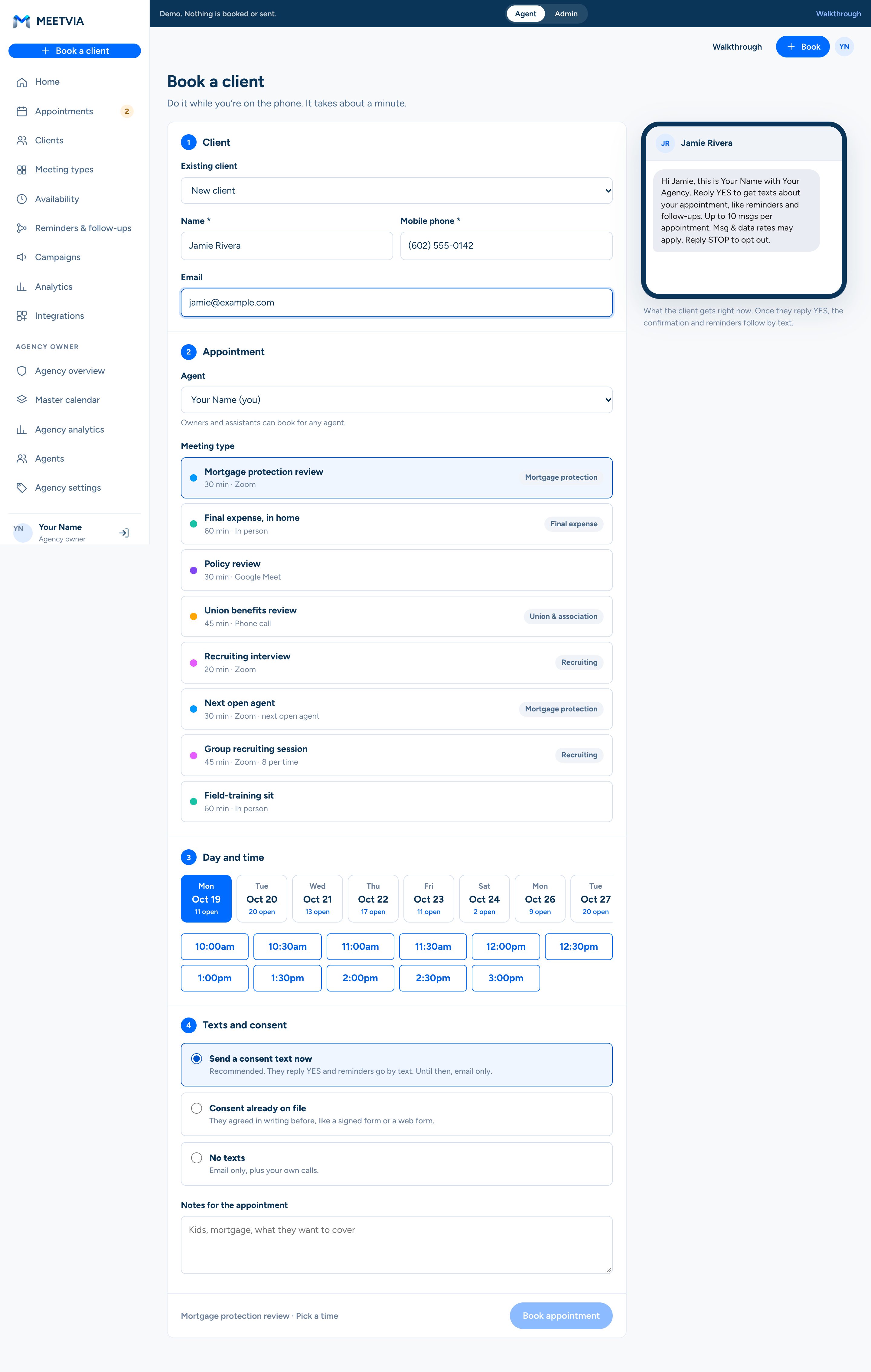
Mortgage protection, final expense, union and association, recruiting. Each market gets its own meeting types, seats, and reminder text.
The mortgage, the family, and what happens to the house if income stops.
See the client page Final expense, in home60 min · In personA kitchen-table sit, with travel time held on both sides.
See the client page Union benefits review45 min · PhoneWalk a union or association member through their supplemental benefits.
See the client page Group recruiting session45 min · Zoom · 8 seatsAn evening session for people thinking about joining. Each time shows the seats left.
See the client pageWith MEETVIA Pro Agency, the owner sees every agent’s calendar, appointment counts, show rate, and close rate on one screen.
Appointments set, held, and closed for each agent this week and this month, with alerts when outcomes go unlogged.
Try itEvery agent’s appointments for the week on one grid, colored by agent. Filter to one agent in a tap.
Try itShow rate, close rate, and no-show win-backs by agent, market, meeting type, day, and time of day.
Try itPick old leads, past no-shows, or no-sales and send a short campaign with a booking link. Campaigns go by email.
Try itSet meeting types per market, each with its own confirmation and reminder text, shared across the agency.
Try itLet more than one client book the same time, like a recruiting night with 8 seats. Each time shows how many are left.
Try itA booked time becomes a calendar event with a video link and a reminder, without copying anything by hand.
When an agent connects Google Calendar, MEETVIA reads only their busy times, so clients aren’t offered a time that’s taken, and adds, moves, or removes the appointments booked in MEETVIA. It doesn’t read other events. See how MEETVIA uses Google data.
See integrations in the demoVerbal consent on a call isn’t enough for marketing texts. MEETVIA gets written consent in one tap and keeps a record of it.
The client gets a text from you and replies YES. Reminders and follow-ups go by text after that, and by email until then.
Name, mobile number, optional email, and notes. No policy numbers, account numbers, or health details.
No account and no app. Reschedule and cancel links are tied to one appointment. Reply STOP ends texts. See the TCPA disclosure.
Short answers about how MEETVIA works for agents, agency owners, and their clients.
All questionsMEETVIA is an agent portal for insurance agents and agencies, operated by Meetvia LLC in Gilbert, Arizona. Agents book appointments for their clients, and MEETVIA sends the consent text, confirmation, and reminders. After the appointment, the agent logs how it went, and MEETVIA follows up: a thank-you after a sale, and a drip to rebook after a no sale or a no-show.
Calendly waits for the client to book. In MEETVIA, the agent books the client, usually during the call, and the follow-up is built around what happened at the appointment. No-shows and no-sales get their own rebooking drips, and owners get a master calendar and per-agent numbers.
Tap Book a client. Enter their name and mobile number, pick the meeting type and a time, and choose how to handle consent. It takes about a minute, and it works on your phone while you’re still on the call.
MEETVIA asks how it went. Pick Sale, No sale, No-show, or Reschedule. A sale sends a thank-you email with your contact info. A no sale starts a 5-day email drip asking to rebook. A no-show gets one “we missed you” text in 15 minutes with a link to pick a new time, and follow-up emails over 5 days. Reschedule opens the booking screen with the client filled in.
MEETVIA texts a client only after they agree in writing. If they didn’t check the box on the booking page, MEETVIA sends one short text from the agent and the client replies YES. That gives you written consent and a record of when it happened. Texts are only about the appointment: confirmations, reminders, and links to reschedule.
The Agency overview shows appointments set, held, and closed for each agent, plus show rate and close rate. The master calendar shows every agent’s appointments for the week on one grid. Agency analytics breaks it down by agent, market, meeting type, day, and time.
Two. MEETVIA Agent is for one agent. MEETVIA Pro Agency adds the master calendar, per-agent analytics, shared meeting types per market, and agency-wide message text for the owner. See features and plans. Pricing is coming soon.
Yes. The MEETVIA demo shows the agent portal, what the client sees, and the agency owner’s view, with no login needed. Nothing in the demo books a real appointment or sends a message. The guided walkthrough shows every screen on a computer and a phone.
Book a client, log a no-show, watch the rebook drip, then open the agency owner’s master calendar. About ten minutes, on a phone or a computer.